Research-based guide. All plan and credit numbers come from Luma’s official pricing page, checked on 13 November 2026. We did not generate videos for this article, so we say nothing about how Luma’s output looks. Anything the page does not state is marked “not verified”. See our editorial policy and affiliate disclosure.
The short answer
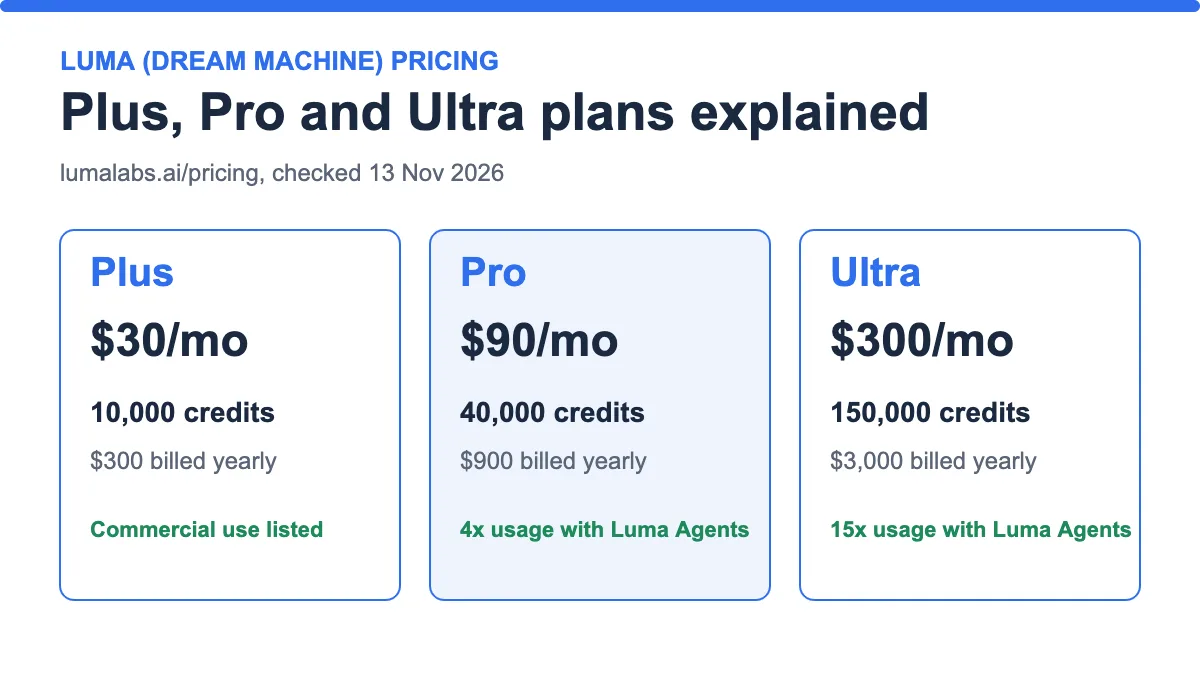
Luma Dream Machine pricing now means three individual plans: Plus at $30 a month, Pro at $90 and Ultra at $300. Luma’s pricing page lists 10,000, 40,000 and 150,000 credits for them, and a per-model credit table that tells you what each clip costs before you start. Many guides still describe an older ladder with a Free plan and a $9.99 Lite plan. Those plans are not on Luma’s official page today.
The most useful number is not the monthly price. It is the credit cost of the model you use. A 5-second Ray3.14 clip at 720p costs 100 credits, which is about $0.30 on Plus. The same length on Veo 3.1 costs 700 credits, about $2.10 on Plus.
| If you… | Pick | Why |
|---|---|---|
| Make up to about 100 five-second 720p Ray clips a month | Plus ($30) | 10,000 credits ÷ 100 credits per clip = 100 clips |
| Make several hundred clips or use 1080p often | Pro ($90) | 40,000 credits cover 400 clips at 720p or 100 at 1080p |
| Run daily, heavy production | Ultra ($300) | 150,000 credits cover 1,500 clips at 720p |
| Want a free trial | Check in the app | The pricing page lists no free plan (not verified whether one exists) |
Luma Dream Machine pricing: the official plans
Luma now trades under the name “Luma” and its pricing page is titled “Plans & Pricing”. Dream Machine is the name older guides use, and Luma’s own support article on Dream Machine pricing points to the same page.
| Plus | Pro | Ultra | |
|---|---|---|---|
| Monthly price | $30 | $90 | $300 |
| Billed yearly | $300 ($25/mo equivalent) | $900 ($75/mo equivalent) | $3,000 ($250/mo equivalent) |
| Credits | 10,000 | 40,000 | 150,000 |
| Price per 1,000 credits (monthly billing) | $3.00 | $2.25 | $2.00 |
| Models | Luma and third-party image and video models | Same as Plus | Same as Plus |
| Commercial use | Listed | Included (“everything in Plus”) | Included (“everything in Pro”) |
| Luma Agents usage | Not stated | 4x | 15x |
| Guest collaborators | Edit access | Included | Included |
Source: lumalabs.ai/pricing, checked 13 Nov 2026. Team and Enterprise plans are “contact us”. The page says yearly saves “up to 20%”; the totals above save $60, $180 and $600 a year, which is 16.7%.

Moving up a plan lowers the price per credit by 25% (Pro) and 33% (Ultra) compared with Plus. It does not change how many credits a clip costs.
Plus, Pro and Ultra in detail
Plus ($30 a month)
- Best for: solo creators who make a limited number of clips and want commercial use.
- Price and credits: $30 a month, or $300 billed yearly, for 10,000 credits.
- What you get: Luma and third-party image and video models, guest collaborators with edit access, and commercial use.
- Pros: lowest entry price; access to many third-party models in one account.
- Cons: highest price per credit; retries and 1080p use credits fast.
Verdict: A sensible start. Run it for one month and count your retries before you decide on more.
Pro ($90 a month)
- Best for: regular creators and small studios.
- Price and credits: $90 a month, or $900 billed yearly, for 40,000 credits.
- What you get: everything in Plus, plus “4x usage with the Luma Agents”. The page does not explain what that multiplier measures.
- Pros: 25% cheaper per credit than Plus.
- Cons: three times the price of Plus for four times the credits, so it only pays off if you actually use them.
Verdict: The step up makes sense once you reliably spend more than 10,000 credits a month.
Ultra ($300 a month)
- Best for: heavy daily production.
- Price and credits: $300 a month, or $3,000 billed yearly, for 150,000 credits.
- What you get: everything in Pro, plus “15x usage with the Luma Agents”.
- Pros: lowest price per credit, at $2.00 per 1,000.
- Cons: a large commitment if your volume is uncertain.
Verdict: Only for creators or teams with proven high volume. Team plans (shared credits, SSO, usage analytics) are “contact us”.
What one clip costs on Luma
Luma publishes credits per clip or per second for each model. We converted them to dollars using the Plus price of $0.003 per credit. On Pro the same clip costs 25% less, and on Ultra 33% less.
| Model and setting | Credits for 5 seconds | Plus ($0.003/credit) | Pro ($0.00225) | Ultra ($0.002) |
|---|---|---|---|---|
| Ray3.14, 360p | 20 | $0.06 | $0.05 | $0.04 |
| Ray3.14, 540p | 50 | $0.15 | $0.11 | $0.10 |
| Ray3.14, 720p | 100 | $0.30 | $0.23 | $0.20 |
| Ray3.14, 1080p | 400 | $1.20 | $0.90 | $0.80 |
| MiniMax H3, 768p (28/s) | 140 | $0.42 | $0.32 | $0.28 |
| Seedance 2.0, 720p (51/s) | 255 | $0.77 | $0.57 | $0.51 |
| Kling 4.0, 720p (53/s) | 265 | $0.80 | $0.60 | $0.53 |
| Kling 4.0, 1080p (79/s) | 395 | $1.19 | $0.89 | $0.79 |
| Veo 3.1, 720p (140/s) | 700 | $2.10 | $1.58 | $1.40 |
Credits from lumalabs.ai/pricing, 13 Nov 2026. Per-second models are multiplied by 5. The audio-capable models listed include audio, according to the page.

Three rules from the page change these numbers. First, Ray3.14 HDR costs 2× the base credits and HDR+EXR costs 3×. Second, 10-second clips on Ray3.14 are text-to-video only and cost 60, 150, 300 and 1,200 credits at 360p, 540p, 720p and 1080p. Third, the Ray3.2 listing adds 30 credits when you do not use keyframes.
Extras also use credits: upscaling to 4K with Luma costs 25 credits a second, and with Topaz 17 credits a second. If you plan to upscale, add that to your budget.
How many clips does each plan cover?

The maths is plan credits ÷ credits per clip. Plus: 10,000 ÷ 100 = 100 clips at 720p, or 10,000 ÷ 400 = 25 at 1080p. This assumes the plan’s credits renew monthly. The pricing page does not use the words “per month” next to the credit totals, so treat that as an assumption and confirm it at checkout.
Retries matter more than the headline number. If one finished clip takes three tries, Plus covers about 33 finished 720p clips, not 100.
Worked scenarios
Scenario 1: you post a few clips a week
Ten finished 720p clips a month with three tries each is 30 generations, or 3,000 credits. That is well inside Plus. Cost: $30, or about $9 of credits actually used, though unused credits may not roll over (not verified).
Scenario 2: you make client work at 1080p
Twenty finished 1080p clips with three tries each is 60 generations × 400 = 24,000 credits. Plus (10,000) is too small. Pro (40,000) fits, at $90 a month.
Scenario 3: you test several models
One try each of Ray3.14 720p, Kling 4.0 720p, Seedance 2.0 720p and Veo 3.1 costs 100 + 265 + 255 + 700 = 1,320 credits, about $3.96 on Plus. That is a cheap way to compare models side by side, and it fits our advice in how to evaluate free AI video tools.

Third-party models: credits per second
Plus gives access to third-party models, and each one has its own credit rate. Higher resolution and newer versions cost far more per second, so the cheapest way to draft is a low-resolution or “Flash” model. Costs below are for a 5-second clip on Plus.
| Model and setting | Credits per second | 5 s on Plus |
|---|---|---|
| Seedance 2.0 Mini, 480p | 12 | $0.18 |
| Seedance 2.0, 480p | 24 | $0.36 |
| Kling 4.0 Flash, 720p | 32 | $0.48 |
| Kling 3.0, 1080p (no audio / with audio) | 40 / 49 | $0.60 / $0.74 |
| Seedance 2.5, 720p | 78 | $1.17 |
| Seedance 2.0, 1080p | 126 | $1.89 |
| Seedance 2.5, 1080p | 191 | $2.87 |
| Kling 3.0, 4K | 147 | $2.21 |
| Seedance 2.0, 4K | 261 | $3.92 |
Credits from lumalabs.ai/pricing, 13 Nov 2026; dollars at $0.003 per credit, rounded.
Upscaling and other add-ons
Luma lists extra tools that also spend credits. They are easy to forget when you budget:
| Tool | Credits | Example: 5-second clip on Plus |
|---|---|---|
| Upscale with Luma to 1080p | 10 per second | 50 credits, about $0.15 |
| Upscale with Luma to 4K | 25 per second | 125 credits, about $0.38 |
| Upscale with Topaz to 4K | 17 per second | 85 credits, about $0.26 |
| Convert to HDR (source up to 1440p) | 10 per second | 50 credits, about $0.15 |
| Remove background | 1 per image | 1 credit |
A 5-second Ray3.14 clip at 720p (100 credits) upscaled to 4K with Topaz (85 credits) costs 185 credits in total, about $0.56 on Plus. That can be cheaper than generating at 1080p directly (400 credits), but only you can judge whether the result is good enough, because we did not test either route.
Does yearly billing pay off?
Luma lists yearly totals of $300, $900 and $3,000. Against twelve monthly payments ($360, $1,080 and $3,600), that saves $60, $180 and $600 a year. If the credits renew monthly, your effective price per 1,000 credits drops to about $2.50 on Plus, $1.88 on Pro and $1.67 on Ultra.
Yearly billing only helps if you keep using the plan. If you pause after three months on Plus, you have paid $300 for $90 worth of use. Run a monthly plan first.
What we could not verify
- A free plan. The pricing page lists none. Some trackers still list a Free plan, a $9.99 Lite plan and a $94.99 Unlimited plan, which do not appear on the official page.
- Whether credits renew monthly, and whether unused credits roll over.
- Watermark rules on each plan.
- What “Luma Agents usage” multipliers measure.
- API pricing. It is separate from the app plans, and we did not check it.
For how we weigh unverified claims, see how to evaluate free AI video tools. For watermark rules on other tools, see free AI video generators without a watermark.
Mistakes to avoid
- Using an old guide’s $9.99 or $29.99 prices. Check the official page.
- Ignoring retries. Divide your credits by tries per finished clip.
- Picking 1080p by default. It costs four times the credits of 720p on Ray3.14.
- Paying for Ultra before you have measured one month of real use.
- Choosing a pricey third-party model, such as Veo 3.1, for drafts.
Pre-purchase checklist
- Open lumalabs.ai/pricing and note today’s prices and credits.
- List the models and resolutions you will use, and find their credit costs.
- Multiply by the number of tries per finished clip.
- Compare the total with 10,000, 40,000 and 150,000 credits.
- Check the renewal, rollover and watermark terms at checkout.
- Start monthly; consider yearly only after a month of real use.
Frequently asked questions
Is Luma Dream Machine free?
Luma’s official pricing page lists only paid plans (Plus, Pro and Ultra) plus Team and Enterprise contact options. Some third-party sites still mention a free plan, so check inside the app.
How much is Luma Dream Machine per month?
Plus is $30, Pro is $90 and Ultra is $300 with monthly billing. Yearly totals are $300, $900 and $3,000.
How many credits do I get?
10,000 on Plus, 40,000 on Pro and 150,000 on Ultra, according to the pricing page.
How much does a Luma video cost?
A 5-second Ray3.14 clip at 720p costs 100 credits, about $0.30 on Plus. At 1080p it costs 400 credits, about $1.20.
Can I use Luma videos commercially?
The pricing page lists commercial use on Plus, and Pro and Ultra include everything in Plus. Read Luma’s terms for the full licence.
Is Luma cheaper than Runway or Pika?
They price differently. Compare cost per clip, not plan price. See our Runway vs Pika comparison for how Runway and Pika work out.
Can I use Kling or Veo inside Luma?
The page lists Kling 4.0, Kling 3.0, Veo 3.1, Seedance and MiniMax models with credit costs. For Kling itself, see our Kling AI review.
Does Luma have a watermark?
The pricing page does not say. We could not verify watermark rules, so check before publishing.
Bottom line
Luma Dream Machine pricing is simple at the top (three plans) and detailed underneath (a credit cost for every model). Start on Plus, measure your real credits per finished clip, and move up only when the numbers say so. Always confirm today’s figures on the official page, because Luma has changed its plans before.
Last updated: 13 November 2026.
Sources
- Luma Plans & Pricing, checked 13 November 2026.