Research-based article. The facts below come from official pricing pages, help pages and terms published by each company, checked on 13 November 2026. We did not generate or download videos for this article, so we cannot tell you how large or visible any watermark looks. Where an official page could not be opened or does not say, we write "not verified" instead of guessing. See our editorial policy and affiliate disclosure.
The short answer
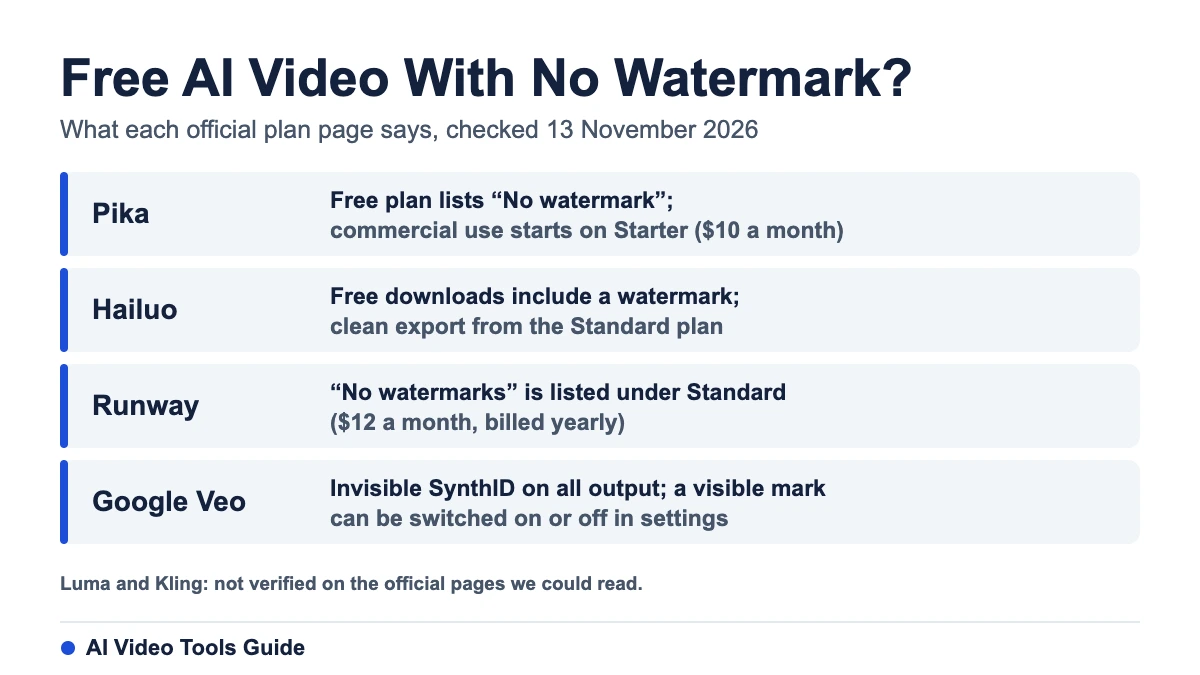
No tool can promise you a clean export from a free plan forever, and the rules differ a lot by tool. On the official pages we could read, Pika lists "No watermark" on its free plan but withholds the commercial license, Hailuo watermarks free downloads, Runway lists "No watermarks" only from its Standard plan, and Google adds an invisible SynthID mark to everything while letting some users switch the visible one off. Two tools, Kling and Luma, could not be confirmed from an official page, so treat any claim about them as unverified.

Watermark rules by tool (checked 13 November 2026)
| Tool | Free plan | Where clean export is stated | Commercial use | Source |
|---|---|---|---|---|
| Pika | Page lists "No watermark"; the Free plan has no monthly credits listed and says "Try all models with credit packs" | Free, Starter and the other plans all list it | Not on Free; Starter ($10 a month, 600 credits) and above | Pika pricing page |
| Hailuo | Downloads include a watermark | Standard plan and higher | Terms say you keep commercial rights to content made on a paid plan | Hailuo subscription terms (last updated 14 July 2025) |
| Runway | 125 one-time credits; the Free list does not mention watermarks | "No watermarks" is listed under Standard ($12 a month billed yearly) | Check the terms for your plan | Runway pricing page |
| Google (Flow, Gemini, Veo) | Invisible SynthID on all output; a visible mark can be switched on or off in settings | Visible mark is forced in India, South Korea and Vietnam unless you are on an Ultra plan | Not covered in the pages we read | Google Flow and Gemini help pages |
| Luma | No free individual plan shown on the page we read | Not verified: the page says nothing about watermarks | "Commercial use" is listed from Plus ($30 a month, monthly view) | Luma pricing page |
| Kling | Not verified: the membership page needs a sign-in | Not verified | Not verified | Official page not readable |
Why "no watermark" and "commercial use" are different questions
A free plan can be clean and still not allow commercial work. Pika is the clearest example: its free plan lists no watermark but marks the commercial license as not included. If you will publish for a client or monetize a channel, the license matters as much as the logo. Read the terms for your exact plan before you deliver anything.
What stays even when the visible logo is gone
Google says every video made with its tools carries an invisible SynthID watermark, and that this mark usually survives re-scaling, recoloring or compression. The visible watermark is a separate setting. That is why "without watermark" in this article always means the visible mark only.
We do not cover third-party watermark removers. Using one on a platform that requires the mark may break that platform's terms, and the safer route is the paid plan or a setting the platform itself provides.
How to check a tool yourself in ten minutes
- Open the official pricing page and look for the words "watermark" and "commercial" next to the Free column, not just the paid ones.
- Open the terms or subscription terms page and search for the same two words.
- Make one short test clip in your own account and download it. Check the corner and the end card at full size.
- Write down the date you checked. Plans change, and several pages we read carry short-term promotions.
Once you know the rules, compare the real cost of a clip using our guide to AI video generator pricing and credits.
Frequently asked questions
Which AI video generator has no watermark on the free plan?
Of the tools whose official pages we could read, only Pika lists "No watermark" on the Free plan. It does not include a commercial license there. Verify in your own account, because plans change.
Does Runway watermark free videos?
Runway's pricing page lists "No watermarks" under Standard but not under Free. The page does not say what Free exports look like, so test one clip before relying on it.
Does Google Veo add a watermark?
Google says all output carries an invisible SynthID mark. A visible watermark can be turned on or off in Flow and in Gemini settings, except in India, South Korea and Vietnam where it is applied unless you have an Ultra plan. Google's Gemini page also says Gemini Omni will replace Veo in the Gemini app.
Is a watermark-free video allowed for commercial use?
Not automatically. Hailuo's terms, for example, tie commercial rights to content made on a paid plan, and Pika's free plan lists the commercial license as not included.
Sources
- Pika pricing page, checked 13 November 2026 (official).
- Hailuo AI Video Subscription Service Terms, last updated 14 July 2025 (official).
- Runway pricing page, checked 13 November 2026 (official).
- Google Flow Help: watermarks and Gemini Apps Help: watermark settings (official).
- Gemini Omni page (official).
- Luma pricing page, checked 13 November 2026 (official).