Research-based review. The facts below come from Kling’s own pages, the Kuaishou launch announcement, and independent reviews, all checked on 13 November 2026. We did not generate any videos for this article, so we make no claim about how good Kling’s output looks in our hands. Where a fact could not be confirmed, we write “not verified”. See our editorial policy and affiliate disclosure.
The short answer
Kling is worth trying if you want realistic motion, long clips and strong reference control, but it is not a “set it and forget it” subscription. Credits disappear fast when you retry, the free plan is not for commercial use, and its public billing reputation is poor. Start with one month of Standard, set a calendar reminder before renewal, and judge it on your own prompts.
- Best for: short films, ads and social clips that need realistic movement and consistent characters.
- Starting price: $0 on Basic (no commercial use), then $6.99 for the first month of Standard, renewing at $8.80.
- Biggest strength: Kling 4.0 generates 3 to 30 seconds in one pass and accepts up to 15 reference files.
- Biggest risk: credit burn on retries and billing complaints.
Quick pick: which plan fits you?
| If you are… | Start with | Why |
|---|---|---|
| Just curious, no client work | Basic (free) | $0, but it is not licensed for commercial use and has no monthly credits. |
| A hobbyist or testing prompts | Standard | Cheapest paid plan, with commercial use and brand watermark removal listed. |
| A regular creator or freelancer | Pro | 3,000 credits at about $1.09 per 100, a better rate than Standard. |
| Producing weekly client content | Premier or Ultra | Lowest cost per credit, but only worth it once you know your real usage. |
What Kling AI is, and what changed with Kling 4.0
Kling is an AI video and image generator from Kuaishou, the Chinese company behind the Kwai short-video app. It turns text prompts or still images into video clips.
On 15 October 2026, Kuaishou announced that Kling 4.0 had officially launched. It is the main reason this review looks different from older ones, many of which still describe Kling 2.x or 3.0.
| Feature | Kling 3.0 | Kling 4.0 |
|---|---|---|
| Clip length per generation | Up to 15 seconds | 3 to 30 seconds |
| Resolution | Up to 4K | 720p, 1080p and 4K listed |
| Reference inputs | Elements library (per reviews) | Omni Reference: up to 15 assets (10 images, 5 videos, 7 subjects) |
| Keyframes | Not verified | Up to 10 keyframe images |
| Prompt length | Not verified | Up to 8,000 tokens |
Sources for this table: Curious Refuge’s Kling 3.0 review (3.0 column) and Kling’s own news post and the Kuaishou launch release (4.0 column). These are the company’s own claims for 4.0, not independent measurements.
What we could not confirm: Kling’s launch post and release note do not list a credit price for 4.0, and we could not confirm which plans include it. Check the generation panel before you buy.
Kling plans and prices
Kling’s own credit guide (dated 28 July 2026) lists five plans. We could not open the live membership page, so prices may have changed since. Always check the checkout screen. The “first month” price applies to first-time subscribers only.
| Plan | First month | Renewal | Monthly credits | 720p videos per Kling | Commercial use |
|---|---|---|---|---|---|
| Basic | $0 | $0 | No monthly credits | Not stated | No |
| Standard | $6.99 | $8.80 | 660 | 33 | Yes |
| Pro | $25.99 | $32.56 | 3,000 | 150 | Yes |
| Premier | $64.99 | $80.96 | 8,000 | 400 | Yes |
| Ultra | $127.99 | $159.99 | 26,000 | 1,300 | Yes |
The same page lists “brand watermark removal” for the paid plans and does not say whether Basic exports carry a watermark. Third-party guides say they do. Treat that as likely but not verified from Kling’s page.
What a clip really costs
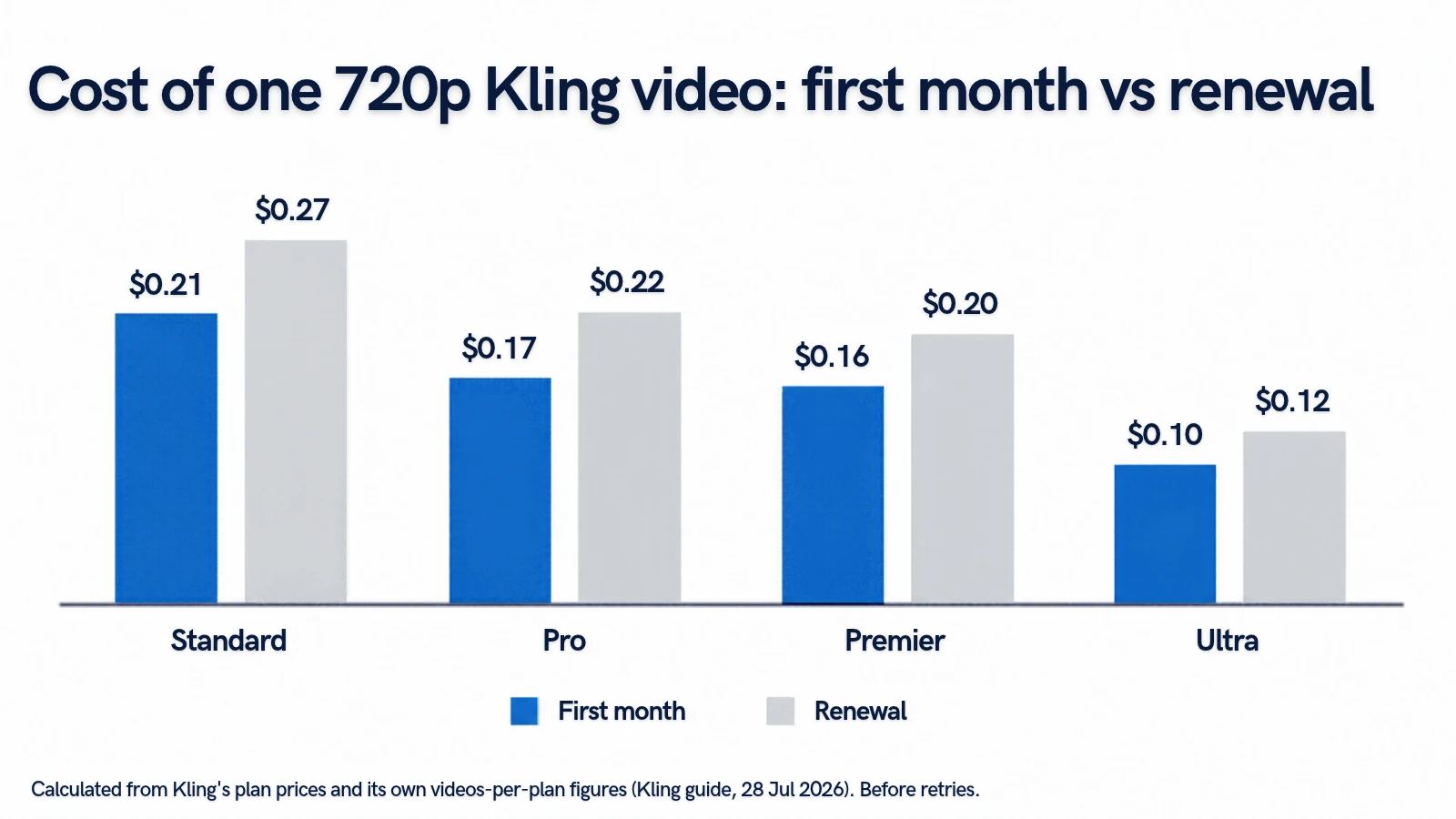
Using Kling’s own “videos per plan” figures, here is the price of one 720p video. These are our calculations from Kling’s numbers, not Kling’s prices.
| Plan | Per 720p video (first month) | Per 720p video (renewal) | If you need 3 tries per keeper | If you need 5 tries per keeper |
|---|---|---|---|---|
| Standard | $0.21 | $0.27 | $0.80 | $1.33 |
| Pro | $0.17 | $0.22 | $0.65 | $1.09 |
| Premier | $0.16 | $0.20 | $0.61 | $1.01 |
| Ultra | $0.10 | $0.12 | $0.37 | $0.62 |
The “tries per keeper” columns are our assumption, not a Kling figure. The point is that AI video is a retry game: if you need five attempts for one usable clip, the real cost is five times the sticker price per video.
One warning on the 33-video figure. Kling’s page does not say which length or mode it assumes. One third-party guide puts a 5-second 720p clip with no audio at 30 credits, which would give you 22 clips on Standard, not 33. Treat 33 as the best case.
4K gets expensive quickly
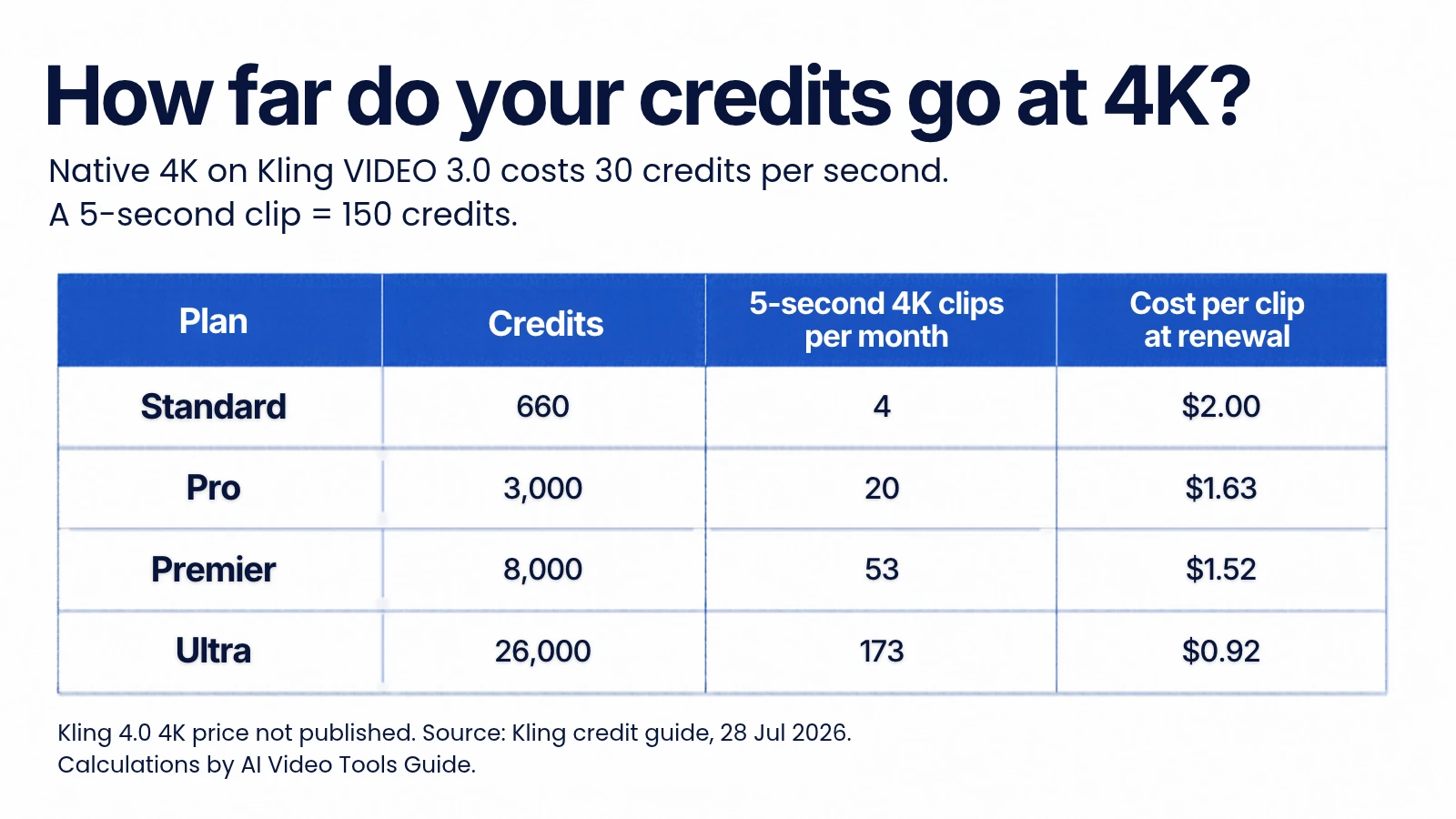
Kling’s credit guide gives one exact per-second rate: native 4K on the VIDEO 3.0 series costs 30 credits per second. A 5-second 4K clip is therefore 150 credits, and a 10-second clip is 300. We could not find a published 4K rate for Kling 4.0, so use these numbers only as a guide.
| Plan | 5-second 4K clips per month | Cost per 5-second 4K clip (renewal) |
|---|---|---|
| Standard (660 credits) | 4 | $2.00 |
| Pro (3,000 credits) | 20 | $1.63 |
| Premier (8,000 credits) | 53 | $1.52 |
| Ultra (26,000 credits) | 173 | $0.92 |
Standard gives you four 4K clips before any retries. If 4K matters to you, Standard is a test plan, not a production plan.
For how credits compare across tools in general, read our guide to AI video generator pricing, credits and real cost per clip.
Is Kling free?
Partly. Kling lists a $0 Basic plan, described as “free forever”, but with no monthly credits and no commercial use. Kling does not appear to publish one fixed free allowance. Third-party guides mention 66 daily credits and sign-up or promotional credits, while Kling’s own membership terms, as summarised by Magic Hour, separate monthly free credits for non-subscribers from daily bonus credits for subscribers.
Practical advice: open your account and read the balance shown there. Do not rely on an article, including this one, for the exact free amount. Several users also report that free accounts hit a “queue is busy” message, so free testing can be slow.
If you are comparing free plans across tools, see which free AI video generators export without a watermark.
What Kling does well
- Realistic motion. Independent reviewers consistently rank it among the best for physical movement and camera work. Chase Jarvis’s hands-on test of Kling 3 called it likely the best general-purpose video model at the time.
- Long single-pass clips. 3 to 30 seconds on 4.0 means fewer stitched shots.
- Control. Up to 10 keyframes and 15 reference assets let you direct a scene instead of hoping a prompt works.
- Native audio and multi-shot. Kling 3.0 already offered both, so you do not need 4.0 for these.
- Reviewer scores. Curious Refuge gave Kling 3.0 a benchmark score of 8.29 out of 10 and recommended it for AI video artists.
In plain terms: the model is the strong part. If you only judged Kling by sample clips, you would probably say yes.
Where Kling falls short
- Credits burn on retries. A failed or unusable result is the normal cost of working with AI video. Kling’s credits policy, as quoted by NemoVideo, says failed generations are refunded. The policy does not say a finished clip that you simply dislike is refunded.
- Queues. Users report long waits, especially on free accounts and at peak hours.
- Billing complaints. See the next section.
- Moving target. Prices, plan names and model access change often. Even Kling’s own guide tells you to confirm live prices before budgeting.
- Not every tool is on 4.0 yet. One review reports that Kling’s Motion Control tool ran only on 3.0 and 2.6 in October 2026. That is a third-party report, so check it in your account.
Can you trust Kling’s billing?
This is the part most positive reviews skip. When we checked Google on 13 November 2026, Kling’s Trustpilot listing showed a rating of 1.2 out of 5 from 443 reviews. Reviewers describe being charged after cancelling, confusing renewal prices, credits spent on poor results, and slow support.
Keep this in context. Review sites attract unhappy customers, and Trustpilot notes that Kling has not invited customers to review, so the rating may not be representative and is not a scientific measure of the product. But the complaints are consistent, and they match something you can check yourself: the first-month discount is real, and the renewal price is about 25 percent higher on every paid plan.
- Standard: $6.99, then $8.80
- Pro: $25.99, then $32.56
- Premier: $64.99, then $80.96
- Ultra: $127.99, then $159.99
Practical protection: pay monthly first, screenshot the plan and price at checkout, add a reminder two days before renewal, and check that your cancellation is confirmed before the next billing date.
Three budgets, worked out
Under $10 a month: Standard
You get 660 credits. By Kling’s own figure that is up to 33 clips at 720p, or about 22 if the third-party rate applies. With 3 attempts per keeper, expect roughly 7 to 11 usable clips. Good for testing prompts and posting a few clips a week. Not enough for 4K or for client batches.
About $30 a month: Pro
You get 3,000 credits, up to 150 clips at 720p, or 20 five-second 4K clips. With 3 attempts per keeper that is around 50 usable 720p clips. This is the sensible tier for a freelancer making ads or Shorts every week.
$65 and up: Premier or Ultra
Only worth it when you have already used up Pro for two months in a row. Premier gives 8,000 credits and Ultra gives 26,000 at the lowest price per credit, $1.01 and $0.62 per 100. Do not start here.
Should you pay for Kling?
If you need clips for a client, you need a paid plan, because Basic is not licensed for commercial use. If you only want to test whether the motion style suits you, stay on Basic, spend the credits you have, and decide after that.
Mistakes to avoid
- Subscribing for a year before testing a month.
- Judging the price by the first-month discount instead of the renewal price.
- Choosing 4K for drafts. Make drafts at 720p and upgrade only the final shot.
- Assuming a plan includes Kling 4.0 without checking your generation panel.
- Using free-plan output in client work. Basic is not licensed for commercial use.
- Buying credit packs and expecting subscription benefits. According to Kling’s FAQ, as quoted by NovoAds, owning credits does not grant subscription benefits, and watermark removal needs an active subscription.
Before-you-pay checklist
- Open Kling and read your current free credit balance.
- Write 5 real prompts from your own work and run them at 720p.
- Count how many attempts it takes to get one usable clip.
- Multiply by the cost per video in the table above to get your real cost.
- Choose the cheapest plan that covers one month of that usage.
- Screenshot the checkout page showing first-month and renewal prices.
- Set a reminder two days before renewal, then decide to keep or cancel.
Kling AI review FAQ
Is Kling AI really free?
There is a free Basic plan, but it is for light testing and not licensed for commercial use. The amount of free credit you receive varies, so check your account.
Does Kling put a watermark on videos?
Kling’s plan table lists brand watermark removal for paid plans. It does not state whether Basic videos carry one, but third-party guides say they do.
How much does a Kling video cost?
By Kling’s own plan figures, a 720p video costs roughly $0.12 to $0.27 at renewal prices, before retries. Native 4K on the 3.0 series is 30 credits per second.
Is Kling 4.0 included in my subscription?
We could not confirm this from a Kling page. Kling 4.0 launched on 15 October 2026, but its launch post gives no price. Check which models appear in your generation panel.
Do Kling credits expire?
According to Magic Hour’s summary of Kling’s terms, monthly subscription credits expire about a month after they are issued, purchased credits last two years, and daily bonus credits expire at local midnight. Confirm in your account terms.
Can I use Kling videos commercially?
Kling’s plan table says content from the paid plans may be used commercially and content from Basic may not. Read the current terms before client work.
Is Kling better than Runway?
We have not tested them side by side. Compare plans on credits per dollar using our pricing guide, then run the same five prompts on each tool’s free plan.
Bottom line
Kling 4.0 is a strong model with real control features, and on motion quality it sits near the top of independent reviews. The trade-offs are retry costs, a renewal price higher than the intro price, and a poor billing reputation. Try one month of Standard on real prompts, keep every receipt, and upgrade only after you know your own cost per usable clip.
Sources
All checked 13 November 2026.
- Kling AI: Kling 3.0 credit cost guide (official, 28 Jul 2026)
- Kling AI: AI video generation news and Kling 4.0 (official, 26 Oct 2026)
- Kuaishou: Kling 4.0 launch announcement (press release)
- Curious Refuge: Kling 3.0 review
- Chase Jarvis: Kling 3.0 hands-on review
- Trustpilot: Kling reviews (rating read via Google, 13 Nov 2026)
- Magic Hour: Kling AI pricing guide (third party; credit expiry summary)
- eesel AI: Kling AI pricing guide (third party; 30-credit clip estimate)
- NovoAds: Is Kling AI free? (third party; FAQ summary)
- NemoVideo: Kling 4.0 cost (third party; refund policy summary)
- Zeely: Kling 4.0 review (third party; Motion Control note)