Research-based guide. Every plan fact below comes from Pika’s pricing page and Pika’s FAQ, checked on 13 November 2026. We did not generate videos for this article, so we make no claim about Pika’s output quality. Anything we could not confirm is marked “not verified”. See our editorial policy and affiliate disclosure.
The short answer
The current Pika AI free plan limits are simple: no monthly credits, no commercial licence, no priority queue, but no watermark on downloads and access to all models. To make anything on the Free plan, you buy a credit pack. The cheapest way to get a monthly credit allowance is the Starter plan at $10 a month.
Many guides still describe a free plan with a monthly generation allowance and watermarked clips. At least one page ranking for this topic says 30 free generations a month at 720p with a watermark. That does not match what Pika’s own FAQ says today, so check any number you read elsewhere against the official pages.
| If you… | Pick | Why |
|---|---|---|
| Want to test Pika once, for personal use | Free plan + a credit pack | No subscription, no watermark, but no commercial use |
| Post clips for clients, ads or a monetised channel | Starter ($10/mo) or higher | Commercial licence is only on paid plans |
| Create a few clips every month | Starter or Creator | Monthly credits refresh; Free has none |
| Run many jobs at once or need a faster queue | Creator or Fancy | Fancy is the only plan that lists a priority queue |
Pika AI free plan limits: what the official pages say
Here is the full comparison. Every cell comes from the pricing page unless the last column says otherwise. Prices are for monthly billing.
| Free | Starter | Creator | Fancy | |
|---|---|---|---|---|
| Price | $0 | $10/mo | $35/mo | $95/mo |
| Monthly credits | None (credit packs only) | 600 | 2,600 | 8,550 |
| Credits per $1 | Not listed | 60 | 74 | 90 |
| Watermark on downloads | No | No | No | No |
| Commercial licence | No | Yes | Yes | Yes |
| Parallel generations | 2 video · 2 image + audio | 2 video · 8 image + audio | 8 video · 32 image + audio | Unlimited |
| Priority queue | No | No | No | Yes |
| Early access to new models | No | No | No | Yes (listed “from $440/mo”) |
| Free Pika H3 Flex generations every day | Not listed | Not listed | Yes (“limited time”) | Yes (“limited time”) |
| All models | Yes | Yes | Yes | Yes |
Source: pika.art/pricing, checked 13 Nov 2026. “Parallel generations” is Pika’s wording for how many jobs can run at the same time.
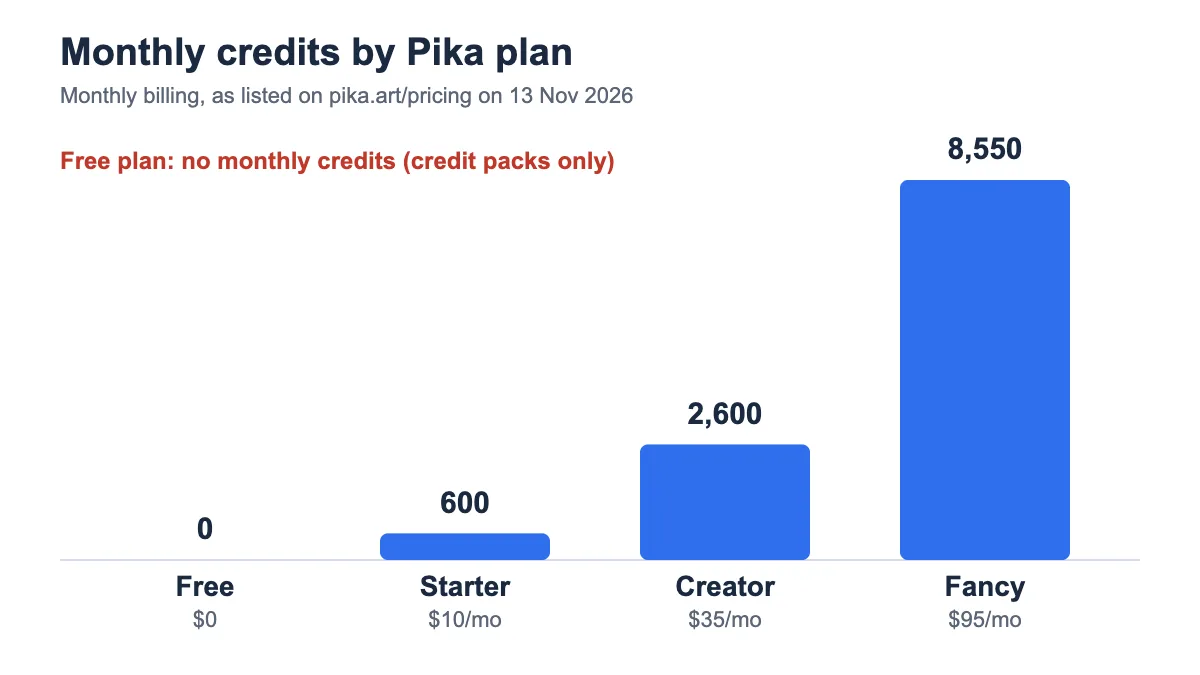
The pricing page also shows a slider on the Fancy card with higher credit tiers (up to 79k credits). We did not verify the price of those larger tiers, so treat them as “not verified”.
What you get on the Pika Free plan
The Free plan is closer to “pay as you go” than to a free trial. You can sign up without paying, but you only get credits when you buy a pack.
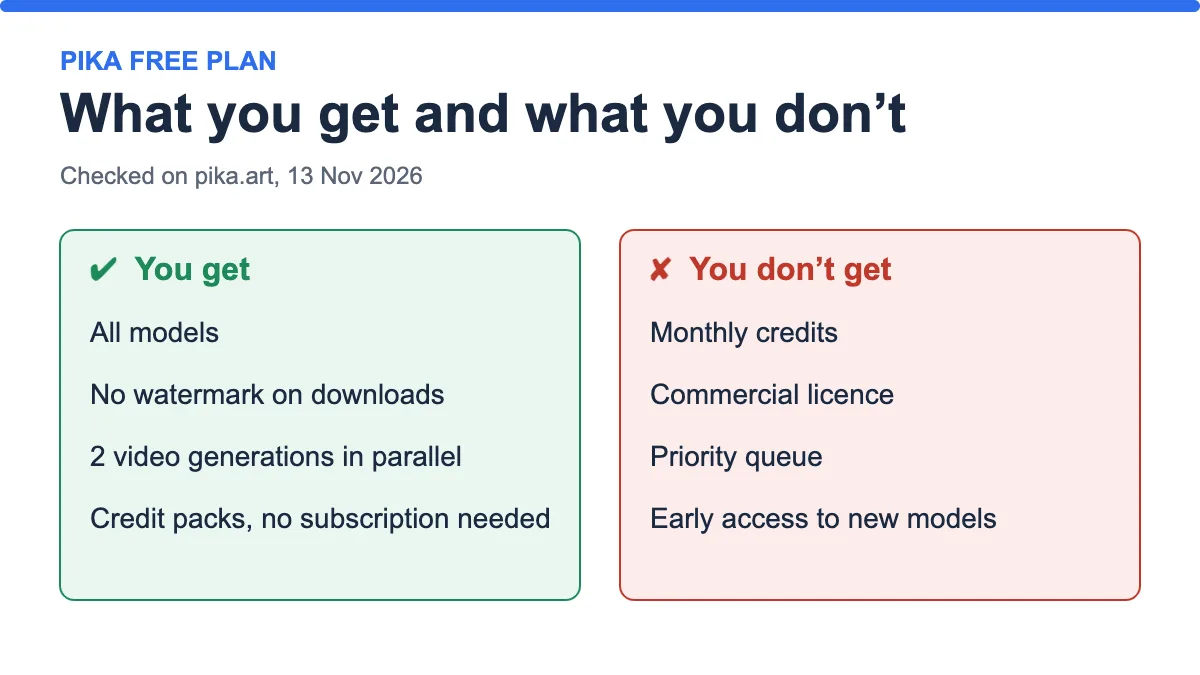
- All models. The pricing page lists all models on every plan, including Free.
- No watermark. The FAQ says downloads on current plans are watermark-free, including Free. Older files that already carry a watermark keep it, and upgrading does not remove it.
- Two video generations at once. Enough for testing, slow if you iterate a lot.
- Credit packs without a subscription. The FAQ says you can buy a one-time top-up on any plan, including Free, and it does not start a subscription.
What the Free plan does not give you
- No monthly credit allowance. The FAQ is direct about this: the Free plan does not include one.
- No commercial use. The FAQ states that free plans do not include commercial use, even when you buy credit packs.
- No priority queue and no early access to new models.
One practical point: because the Free plan has no commercial licence, a watermark-free file is not the same as a file you may use in client work. If you need both, read our guide to free AI video generators without a watermark and check the licence line of every tool before you publish.
How Pika credits work
Credits are the currency. Each generation spends some, and the amount depends on the app, the model and your settings. Pika’s FAQ says every app shows the estimated cost before you generate, so you can see the price first. We could not verify a fixed credit cost per clip, and it can change, so we do not quote one.
Two rules decide how long your credits last:
- Monthly plan credits refresh every month, including on annual plans. They do not carry over.
- Top-up pack credits carry over and expire 365 days after purchase.
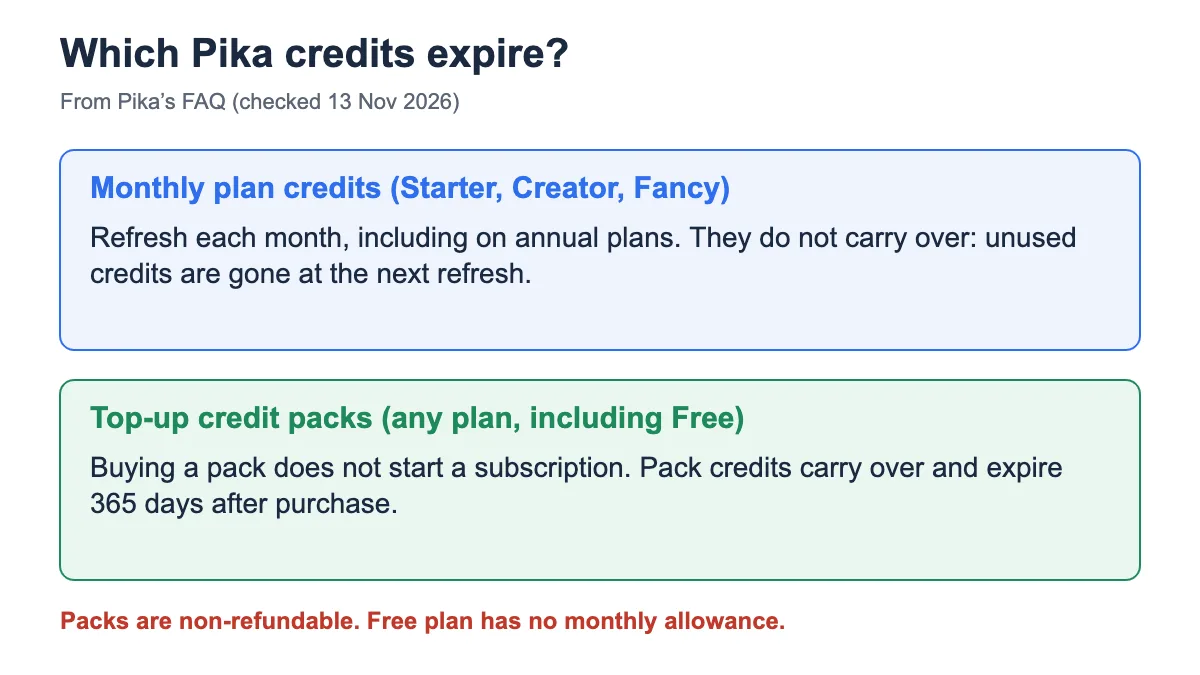
This matters if you only make clips now and then. A subscription’s credits vanish when the month ends, while a pack bought on the Free plan lasts up to a year. The price of a pack is shown inside the app, which needs a signed-in account, so we mark pack prices as “not verified”. For the general logic behind credit systems, see how AI video credits and plans work.
Two more rules from the FAQ: subscription payments and credit packs are non-refundable, and if a generation fails and you lose credits, you contact support with the details so they can investigate.
Paid plans compared
Starter ($10/mo)
- Best for: low-volume creators who need a commercial licence.
- Price and credits: $10 a month for 600 credits, which Pika lists as 60 credits per $1.
- What you get: all models, no watermark, commercial licence, 2 video and 8 image jobs in parallel.
- Pros: cheapest way to get both a monthly allowance and commercial use.
- Cons: smallest allowance, and unused credits do not roll over.
Verdict: Starter is the entry point for anyone who earns from their clips. If you only experiment, you are paying for a licence you do not use.
Creator ($35/mo)
- Best for: regular creators who run several jobs at the same time.
- Price and credits: $35 a month for 2,600 credits, listed as 74 credits per $1.
- What you get: everything in Starter, plus 8 video and 32 image jobs in parallel and free Pika H3 Flex generations every day (marked “limited time”).
- Pros: better credit value than Starter and much more parallel capacity.
- Cons: no priority queue, and the daily free generations are a limited-time perk that may end.
Verdict: The most popular plan on the page makes sense once you hit Starter’s limit in the first week of the month.
Fancy ($95/mo)
- Best for: heavy users and small teams that cannot wait in a queue.
- Price and credits: $95 a month for 8,550 credits, listed as 90 credits per $1.
- What you get: unlimited parallel generations, priority queue, and early access to new models (listed “from $440/mo”), plus the limited-time daily H3 Flex generations.
- Pros: best credit value and the only plan with a priority queue.
- Cons: expensive for anyone who is still testing.
Verdict: Only worth it if queue time costs you money. Otherwise Creator gives you most of the benefits for much less.
Pika also lists Team plans (two-seat minimum): Creator at $35 per seat and Pro at $95 per seat, with shared credits. We did not check the team terms in detail.
Worked examples: what your money buys
Pika does not publish one fixed credit cost per clip, so these numbers use an example of 50 credits per clip. Replace 50 with the cost the app shows for your model and settings.
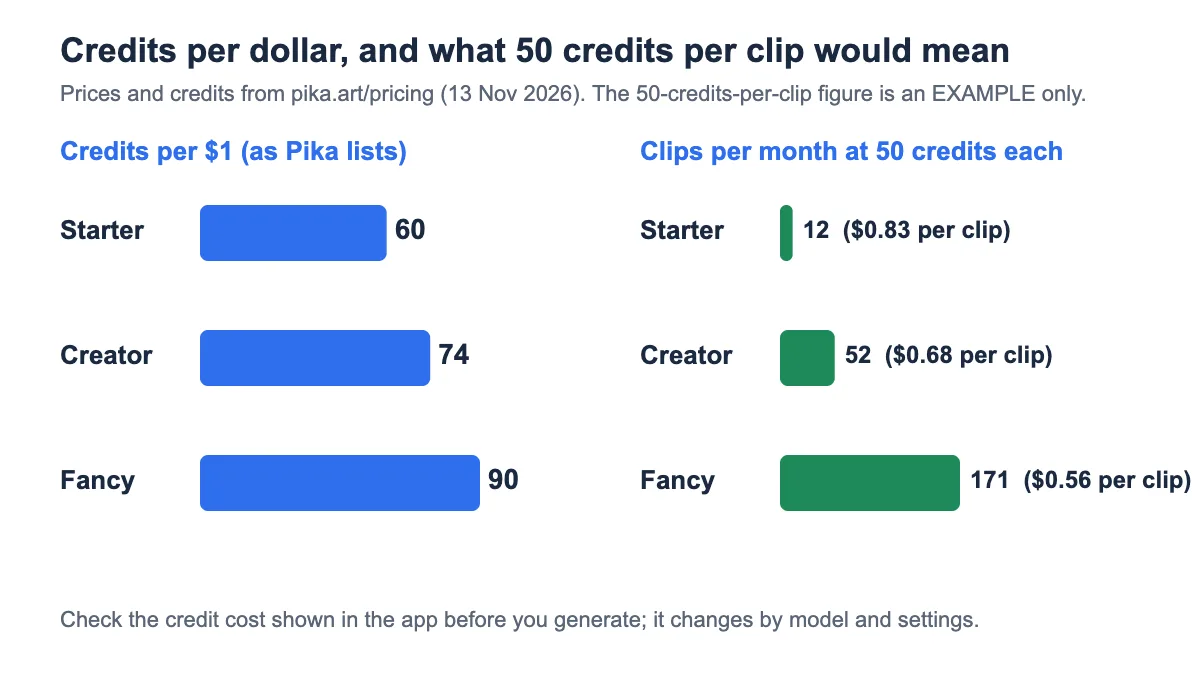
| Plan | Credits | Clips at 50 credits each | Approx. cost per clip |
|---|---|---|---|
| Starter | 600 | 12 | $0.83 |
| Creator | 2,600 | 52 | $0.68 |
| Fancy | 8,550 | 171 | $0.56 |
The maths: clips = monthly credits ÷ credits per clip, and cost per clip = credits per clip ÷ credits per $1. At 50 credits, Starter gives 600 ÷ 50 = 12 clips and costs 50 ÷ 60 ≈ $0.83 per clip.
Scenario 1: you just want to see what Pika can do
Use the Free plan and buy one small pack. You skip a subscription, get no watermark, and your pack credits last up to 365 days. Do not publish the results commercially.
Scenario 2: you make social clips for a client
You need a commercial licence, so you need Starter at minimum. If you reach 12 clips (in our example) before the month ends and keep retrying prompts, step up to Creator. Our guide on how to evaluate free AI video tools helps you decide before you commit.
Scenario 3: you run a content team
Look at Creator for parallel capacity, or Fancy if queue time blocks your work. Compare the Team plans if several people share one credit pool.
How to choose
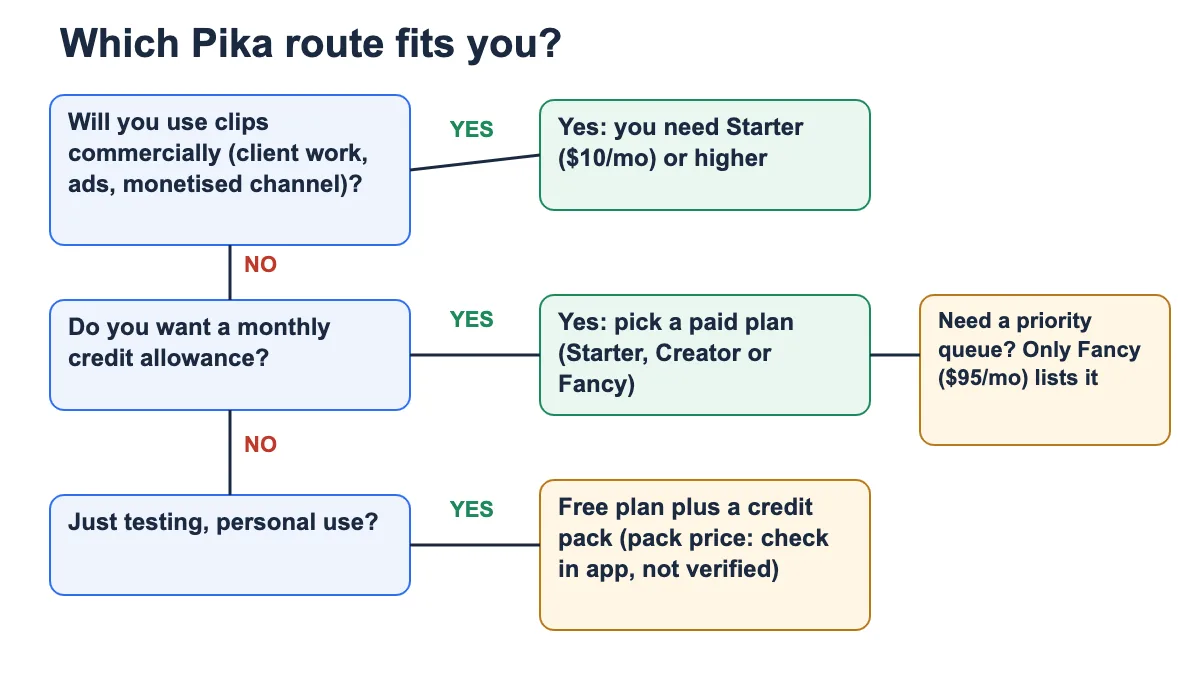
If you are still unsure whether you need image-to-video or text-to-video, read text-to-video or image-to-video first, because the model you use changes the credit cost.
Mistakes to avoid
- Trusting an old guide that says the Free plan gives monthly credits or watermarked clips.
- Assuming “no watermark” means “free for commercial use”. It does not.
- Buying a subscription for one-off testing, when a pack would do.
- Forgetting that monthly credits do not carry over, then losing the unused ones.
- Ignoring the credit estimate the app shows before you generate.
Pre-purchase checklist
- Open Pika’s pricing page and write down today’s price and credits.
- Decide whether you will use any clip commercially.
- Generate one test clip and note the credit cost the app shows.
- Multiply: monthly credits ÷ that cost = clips per month.
- Decide if a pack (365-day expiry) or a plan (monthly refresh) fits your pace.
- Set a calendar reminder before renewal. Payments are non-refundable.
Frequently asked questions
Is Pika AI free?
You can sign up for free, but the Free plan has no monthly credits. You buy credit packs to generate. Check Pika’s pricing page for what is on offer today.
Does the Pika free plan have a watermark?
According to Pika’s FAQ, downloads on current plans are watermark-free, including Free. Older files that already have a watermark keep it.
Can I use Pika free plan videos commercially?
No. The FAQ says the Free plan does not include commercial use, even if you buy credit packs. Starter, Creator and Fancy do.
Do Pika credits expire?
Monthly plan credits refresh every month and do not carry over. Top-up pack credits carry over and expire 365 days after purchase.
How many credits does one Pika video cost?
It depends on the app, model and settings. Pika shows the estimate before you generate. We did not verify a fixed number.
Can I get a refund on Pika credits?
Pika’s FAQ says subscription payments and credit packs are non-refundable. If a generation fails and you lose credits, contact support.
How long can Pika videos be?
The FAQ says Video Studio supports short clips and multi-shot videos up to 30 seconds with supported models. Length and resolution depend on the app and model.
Which plan is cheapest for commercial use?
Starter at $10 a month is the lowest-priced plan that lists a commercial licence.
Bottom line
The Pika AI free plan limits come down to three things: no monthly credits, no commercial use, no priority queue. If you only test, a Free plan plus a pack is enough. If you earn from your clips, start at Starter and move up only when you run out of credits. Always confirm the numbers on the official page before paying, because plans change.
Last updated: 13 November 2026.
Sources
- Pika pricing page, checked 13 November 2026.
- Pika FAQ and help center, checked 13 November 2026.